티스토리 뷰
[AI] Codex Automation으로 “이슈 1개 → Draft PR” 밤새 돌려보기 (worktree/sandbox/gh/prompt)
택꽁이 2026. 3. 26. 16:44이번 글은 “Codex Automation”을 활용한 에이전트 코딩 관련 포스트의 3편이다.
- [AI] 자동화를 위한 GitHub Issue 운영 체계 만들기 (라벨/템플릿/분류)
- [AI] GitHub Actions + BigQuery로 Nightly Report 자동 수집 파이프라인 구축하기
- [AI] Codex Automation으로 “이슈 1개 → Draft PR” 밤새 돌려보기 (worktree/sandbox/gh/prompt)
앞선 1~2편에서 이슈를 모으고(운영 체계 + 라벨/템플릿), Nightly report로 신호를 쌓는 파이프라인까지 만들었다.
이제 밤새 자동화가 이슈 하나를 가져가서, “수정 → PR 생성”까지 해주는 흐름을 실제로 굴려보는 작업이 남았다.
다만 여기서 목표는 “자동 merge”가 아니다. 내가 기대하는 작업은 아래와 같다.
- 안전하게(=격리된 환경에서)
- 최소 변경으로
- Draft PR로 결과물을 남겨주기
- 나는 낮에 PR을 보고 결정만 하기
기대하는 플로우
- Codex Automation이 조건에 맞는 이슈 1개 선택
- git worktree로 격리된 작업 공간 생성
- sandbox 규칙 아래에서 최소 변경으로 수정
- 커밋 생성
- gh로 Draft PR 생성
- (선택) PR 본문에 “변경 요약/테스트 플랜/리스크”까지 자동 작성
위 플로우에서 내가 제일 먼저 챙긴 건 작업 공간 격리였다.
에이전트가 밤새 코드를 만지는 동안, 내 로컬 레포(내가 쓰는 브랜치)가 더러워지는 순간부터 짤막한 내 기억력으로는 관리 난이도가 확 올라간다 생각했다.
그래서 이번 자동화에서는 git worktree를 사용한다.
worktree는 하나의 Git 레포(.git)는 공유하면서, 브랜치별로 별도의 작업 폴더(Working Directory)를 추가로 만들어 동시에 작업할 수 있게 해주는 기능이다.
worktree를 사용하면
- 에이전트가 파일을 많이 건드려도 내 메인 작업 폴더는 안전하게 유지되고
- 이슈별로 작업 결과가 폴더 단위로 분리돼서 추적/리뷰가 쉬워지고
- 실패하거나 마음에 안 들면 worktree 폴더를 지우는 것만으로 깨끗하게 정리할 수 있다.
즉, 밤에 자동화가 실수하더라도, 낮에 수습 가능한 형태로 남기기에 용이할 것이라 생각했다.
이슈는 어떻게 고를까? (gh로 후보 추리기)
이슈를 골랐다면, 이제는 에이전트가 수정할 수 있는 범위를 제한해야 한다.
그래서 sandbox 규칙을 먼저 정해두고, 작업 범위를 강제로 좁혔다. 여기서 의외로 도움이 된 게 모듈화였다.
기능이 모듈 단위로 분리되어 있으니 area:* 라벨만으로도 '어느 폴더/모듈을 건드리면 되는지'가 명확해졌고, 프롬프트에서 수정 범위를 딱 잘라 말할 수 있었다.
금지 사항
- 의존성 업데이트 / 빌드 설정 변경
- 이슈와 무관한 리팩토링
- 테스트가 없는 상태에서 대규모 수정
완료 조건(반드시 남길 것)
- “어떻게 검증했는지” 테스트 플랜 작성
- 가능한 최소 수정
prompt
위에서 정리한 원칙(worktree 격리, 모듈 경계, 최소 변경, Draft PR)는 프롬프트에 박아넣었다. 프롬프트는 크게 네 덩어리로 구성했다.
첫 번째는 Preflight다.
밤새 돌아가다가 인증 문제나 레이트리밋 때문에 1분 만에 허무한 상황을 방지한다. 그래서 시작하자마자 gh auth status와 rate_limit을 확인하고, GitHub API 호출이 불가능하면 그 자리에서 종료하도록 했다.
Preflight (log outputs in memo)
pwd
git rev-parse --show-toplevel
curl -sS -I <https://api.github.com> | head -n 1 || true
gh auth status || true
gh api <https://api.github.com/rate_limit> >/dev/null || { echo "gh_api=FAIL"; exit 0; }
echo "gh_api=OK"
두 번째는 Issue selection이다.
자동화가 매번 흔들리지 않게 기준을 고정했다.
go:fix + status:ready만 대상으로 삼고, 진행 중인 이슈(status:in-progress)는 제외한다. 우선순위는 prio:p0 → p1 → p2 순으로 내려가고, 같은 우선순위 안에서는 가장 최근 업데이트된 이슈 1개만 고른다.
이 단계에서 이슈가 없으면 “할 게 없다”는 의미이므로 아무 변경도 하지 않고 멈춘다.
Issue selection (pick ONE, via gh)
- Try p0:
  gh issue list -R LeeTaek/Carve -S 'is:issue is:open label:go:fix label:status:ready -label:status:in-progress label:prio:p0' --json number,title,updatedAt,labels --limit 20
- Else p1, else p2 with the same format.
- Choose exactly one issue: the most recently updated (max updatedAt).
- If none, stop without making any changes.
세 번째가 Scope boundary다.
프로젝트를 모듈화해 둔 덕분에 area:* 라벨 하나만으로도 “고칠 범위”를 명확히 자를 수 있었다.
그래서 프롬프트에서 area:* 라벨을 수정 범위의 경계로 강제했다. area:* 라벨이 없거나, 여러 개가 붙어 범위가 애매하면 코딩을 시작하지 않고 이슈에 코멘트를 남기고 종료한다.
Issue selection (pick ONE, via gh)
- Try p0:
  gh issue list -R LeeTaek/Carve -S 'is:issue is:open label:go:fix label:status:ready -label:status:in-progress label:prio:p0' --json number,title,updatedAt,labels --limit 20
- Else p1, else p2 with the same format.
- Choose exactly one issue: the most recently updated (max updatedAt).
- If none, stop without making any changes.
마지막은 결과물이다.
목표는 “이슈 1개 → Draft PR 1개”로 단순화했다.
이슈를 가져오면 먼저 한국어로 Expected/Actual을 1~3줄로 요약하고, 중복 작업을 막기 위해 status:ready를 제거하고 status:in-progress로 잠그도록 했다. 수정은 최소 단위로 하고, 가능하면 회귀 테스트를 추가한다
(특히 TCA라면 TestStore 기반 리듀서 테스트를 우선).
테스트는 tuist test를 우선 시도하고, 안 되면 xcodebuild로 내려가며, 실행이 불가능한 환경이라면 실패 이유와 로컬에서 실행할 정확한 커맨드를 PR 본문에 남기게 했다.
그리고 마지막에 gh로 Draft PR을 생성하되, PR 본문에는 요약/변경 내용/테스트 방법/리스크·롤백/Closes #이슈번호를 반드시 포함하도록 강제했다. 이슈에도 PR 링크와 테스트 결과를 코멘트로 남기고, merge 전까지는 status:in-progress를 유지한다.
Workflow
1) Fetch the selected issue details and summarize in Korean (1-3 bullets) what must be fixed (Expected vs Actual).
2) Lock the issue:
   - Remove label "status:ready" and add label "status:in-progress".
3) Create a branch: codex/issue-<ISSUE_NUMBER>-<short-slug>.
4) Implement the fix (respect the `area:*` scope boundary).
5) Add regression tests (prefer TCA TestStore reducer tests when applicable).
6) Run tests (best effort). Prefer Tuist:
   - Try: `tuist test` (or `tuist test <scheme>`).
   - Fallback: `xcodebuild test ...`.
   - If tests cannot run due to sandbox restrictions, record the exact failure and provide local commands to run.
7) Open a Draft PR targeting main:
   - Title format: [<area:...>] <issue title> (fallback: [BUG])
   - Body (Korean) must include:
     - 요약(무엇/왜)
     - 변경 내용(핵심 3줄)
     - 테스트 방법/결과(로컬 실행 커맨드 포함)
     - 리스크/롤백
     - Closes #<ISSUE_NUMBER>
8) Apply labels to the PR (best effort): copy `area:*` and `prio:*` from the issue.
9) Comment on the issue in Korean with PR link + summary + test results/commands.
10) Keep "status:in-progress" on the issue until merged. Do NOT re-add "status:ready" automatically.
전문을 정리하면 다음과 같다.
You are working in the repository "\{git repo}”.
Use gh CLI for all GitHub operations (issue selection/label changes/comments/PR creation).

Worktree / workspace

- Assume you are running inside an isolated git worktree directory created for this issue.
- Do NOT operate on any other working directory. All changes must stay within the current worktree.
- Log `pwd` and `git rev-parse --show-toplevel` to confirm the workspace.

Preflight (log outputs in memo)
pwd
git rev-parse --show-toplevel
curl -sS -I [https://api.github.com](https://api.github.com/) | head -n 1 || true
gh auth status || true
gh api https://api.github.com/rate_limit >/dev/null || { echo "gh_api=FAIL"; exit 0; }
echo "gh_api=OK"

Goal

- Every run, pick exactly ONE GitHub issue and produce a Draft PR that fixes it.
- Outputs (PR body + issue comment) must be written in Korean.

Issue selection (pick ONE, via gh)

- Try p0:
gh issue list -R LeeTaek/Carve -S 'is:issue is:open label:go:fix label:status:ready -label:status:in-progress label:prio:p0' --json number,title,updatedAt,labels --limit 20
- Else p1, else p2 with the same format.
- Choose exactly one issue: the most recently updated (max updatedAt).
- If none, stop without making any changes.

Scope boundary (module-aware / uses modularization)

- This repo is modularized. Use the issue's `area:*` label as the scope boundary.
- Identify exactly one `area:*` label on the issue.
    - If there is no `area:*`, stop: comment on the issue in Korean requesting an `area:*` label, and DO NOT code.
    - If there are multiple `area:*`, stop: comment asking to pick exactly one, and DO NOT code.
- Only modify files under the module/directory corresponding to that `area:*`.
- Do NOT broaden scope “just in case”. Keep the diff minimal and reversible.

Safety rules

- Do NOT change unrelated code. Keep the fix minimal.
- One issue = one PR. Do not bundle multiple issues.
- Do NOT merge. Create a Draft PR only.
- Do NOT upgrade dependencies, change build settings, or perform large-scale refactors.
- If you cannot run tests in this environment, still add tests and write exact local commands to run.

Workflow

1. Fetch the selected issue details and summarize in Korean (1-3 bullets) what must be fixed (Expected vs Actual).
2. Lock the issue:
    - Remove label "status:ready" and add label "status:in-progress".
3. Create a branch: codex/issue-<ISSUE_NUMBER>-<short-slug>.
4. Implement the fix (respect the `area:*` scope boundary).
5. Add regression tests (prefer TCA TestStore reducer tests when applicable).
6. Run tests (best effort). Prefer Tuist:
    - Try: `tuist test` (or `tuist test <scheme>`).
    - Fallback: `xcodebuild test ...`.
    - If tests cannot run due to sandbox restrictions, record the exact failure and provide local commands to run.
7. Open a Draft PR targeting main:
    - Title format: [area:...] <issue title> (fallback: [BUG])
    - Body (Korean) must include:
        - 요약(무엇/왜)
        - 변경 내용(핵심 3줄)
        - 테스트 방법/결과(로컬 실행 커맨드 포함)
        - 리스크/롤백
        - Closes #<ISSUE_NUMBER>
8. Apply labels to the PR (best effort): copy `area:*` and `prio:*` from the issue.
9. Comment on the issue in Korean with PR link + summary + test results/commands.
10. Keep "status:in-progress" on the issue until merged. Do NOT re-add "status:ready" automatically.

Hints

- Respect TCA + MicroArchitecture.
- Variable names must be at least 2 characters long.
테스트
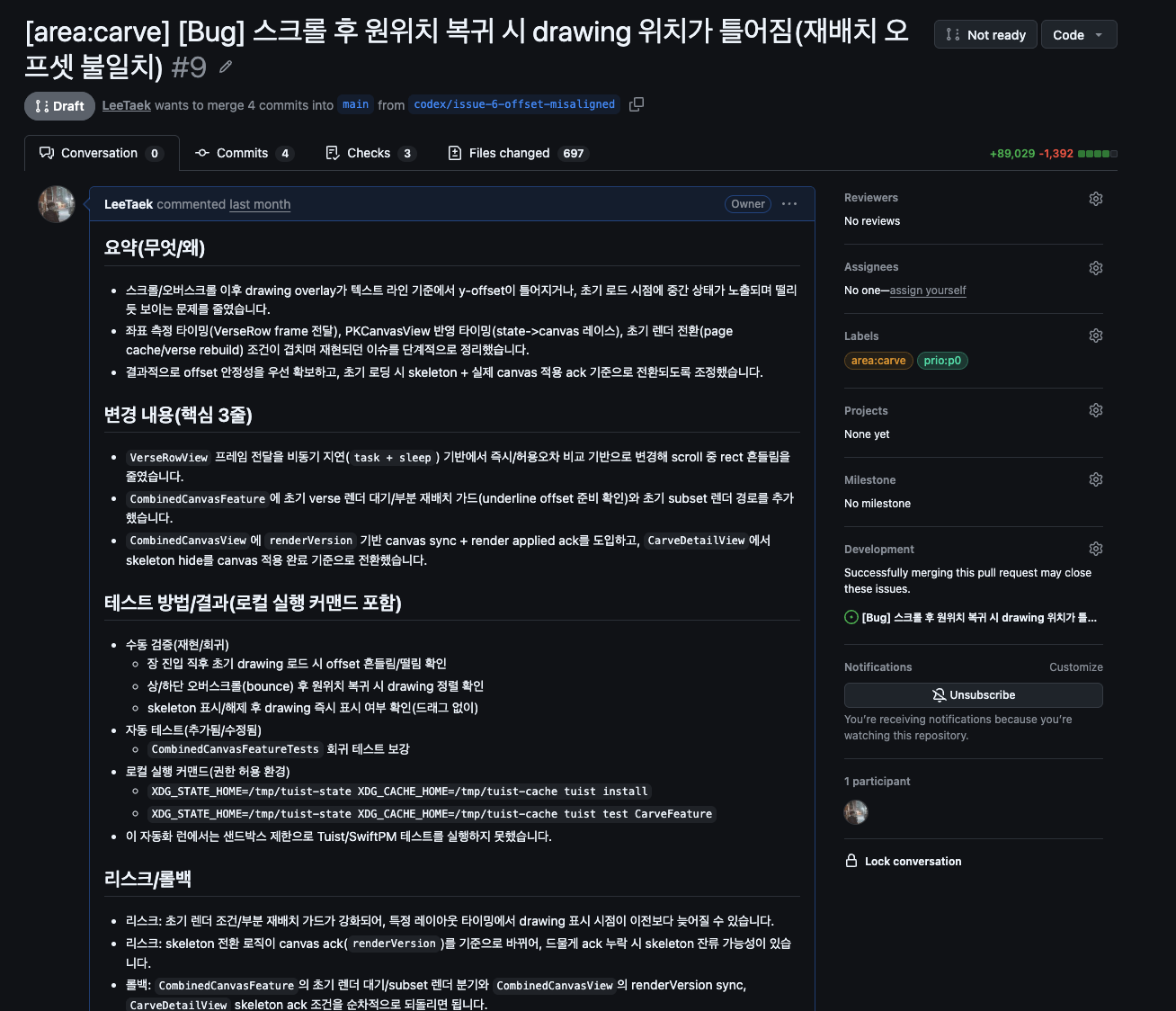
프롬프트를 만들었으면, 이제는 “진짜로 PR이 하나 올라오는지”를 확인해야 한다. 그래서 이슈 하나를 직접 만들어서, Codex Automation을 테스트해봤다.
1. GitHub Issues에 테스트용 이슈를 작성하고 status:ready로 올렸다.(가능하면 범위가 좁고, area:* 라벨이 명확한 이슈로.)

2. Codex에서 프롬프트 테스트 버튼을 눌러 한 번 실행했다.

3.실행이 정상이라면 다음 변화가 순서대로 일어난다.
- 이슈의 라벨이 status:ready → status:in-progress로 바뀌고(중복 작업 방지)
- 작업 브랜치가 생성된 뒤
- Draft PR이 올라온다. PR 본문에는 요약/변경 내용/테스트 방법/리스크(롤백)까지 포함된다.
아직 앱을 배포하지 않은 상태라 Analytics 이벤트는 실제 데이터로 검증하진 못했다.
그래서 이 단계에서는 파이프라인(Export/권한/워크플로/Issue 누적 기록)이 정상 동작하는지만 확인했고, Analytics 자체는 배포 후 실제 이벤트가 쌓이는 시점에 다시 테스트해봐야 겠다.
잘 동작하는 것 같으니 일단 사소한 버그들부터 Issue에 좀 올려놔야겠다.
- Total
- Today
- Yesterday
- IOS
- github
- TCA
- iOS 13.0+
- ChatGPT
- Alamofire
- uikit
- combine
- SWIFTUI
- concurrency
- codex
- 프롬프트
- ios18
- network
- navigationsplitview
- AI
- SWIFT
- Git
- composablearchitecture
- Firebase
- xcodecloud
- 에이전트코딩
- xcode
- Tuist
- Analytics
- tuist #xcodecloud #ios #ci/cd #swiftlint #firebase
- automation
- UI
- 자동화
- swiftdata
| 일 | 월 | 화 | 수 | 목 | 금 | 토 |
|---|---|---|---|---|---|---|
| 1 | 2 | 3 | 4 | |||
| 5 | 6 | 7 | 8 | 9 | 10 | 11 |
| 12 | 13 | 14 | 15 | 16 | 17 | 18 |
| 19 | 20 | 21 | 22 | 23 | 24 | 25 |
| 26 | 27 | 28 | 29 | 30 |